“You can advertise in ChatGPT now” can sound like paying to have your product recommended in an answer. I would not treat those as the same thing. My first questions are simpler: where could a shopper encounter the ad, and what would make the product worth exploring after the click? A handbag makes that discussion more concrete.
Writing an ad is not the same as running one
Asking ChatGPT for ten handbag headlines prepares content. ChatGPT Ads is a channel for advertising in ChatGPT, with an ad account, materials, budget and review. OpenAI provides a separate advertising entry point; typing “recommend my store” in a regular conversation does not launch a campaign. OpenAI: ChatGPT Ads overview
Keep paid advertising separate from a brand being mentioned in an organic answer. This guide covers the former. It does not teach you to buy a supposed AI recommendation, or treat an ad impression as an endorsement of the product.
Where can an ad appear, and where does the click go?
Official targeting documentation lists ChatGPT web, iOS and Android inventory. These are configurable platforms, not a promise of advertising in every country, account or conversation. A demonstration screenshot is not proof of a fixed position or crop for everyone. OpenAI: campaign targeting
For a standard image-and-copy ad, the ingredients are a title, body, image and destination URL. The useful thing to map is the shopper's path, not the exact shape of a button. OpenAI: creatives and previews
- Describe a needFor example, a bag for everyday outfits.
- May encounter an adDecide whether its image and copy deserve a closer look.
- Visit the product pageCheck dimensions, straps, compartments and price.
- Choose what to doKeep comparing, leave, or order from the store.
“I wear a coat to work and want a bag that is not too formal” is a question we drafted to understand a shopper, not a captured conversation. Context hints can add use information, but they are not exact-match keywords or guaranteed ad triggers. OpenAI: campaign targeting
The job continues after the click. If the ad suggests an everyday bag but the page has only a front view and no strap measurements, a new advertising channel will not answer the missing question.
Can your business advertise? Check your own account
Start with “Sign Up to Advertise” on OpenAI's official advertising page. Being able to use ChatGPT, owning a Shopify store or seeing another seller's onboarding screenshot does not confirm your business's access. OpenAI: ChatGPT Ads overview
| Check | Where to check | Do not assume |
|---|---|---|
| Whether your business can establish and use an ad account | The official application entry point and account notices. | An accessible sign-up page means approval. |
| Whether your target market is available | Your account's available locations and campaign settings. | A supported country is open to every account. |
| Whether the necessary reviews are complete | Account, brand and ad review statuses. | An active account has passed every review. |
Configured account status and review status are separate. OpenAI notes that an active account can still have outstanding reviews or other delivery restrictions. This guide cannot establish eligibility from a store URL or declare that every cross-border seller qualifies. OpenAI: account management
If access is unavailable or review is pending, record the specific blocker and ask official support. Prepare product information while you wait; do not hand over a password, borrow an account or buy a promise of guaranteed approval to rush the process.
For this bag, I would start with one buying question
A · Inspect the design
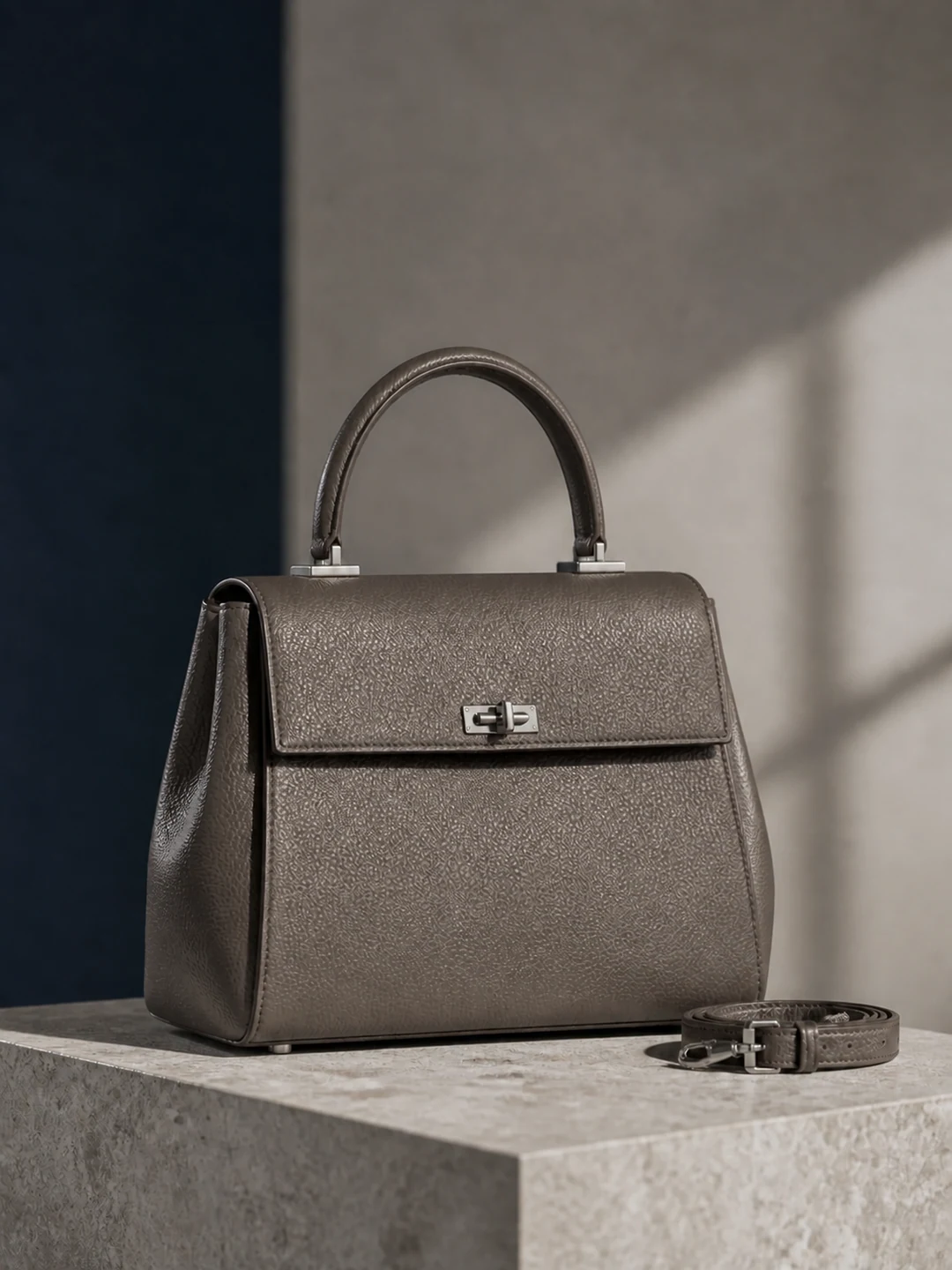 Enlarge image
B · Imagine the outfit
 Enlarge image
The second image makes me think about an outfit for work. But before buying, I might ask: is the strap long enough to wear over my winter coat? Another line about premium style would do less than a strap measurement and a real shoulder-carry photo.
These are our AI concepts, not photographs of a physical item. They help discuss presentation, not establish material, capacity or comfort. For your real product, I would check the measured strap range, interior photos and exact variant before writing the ad.
- Image direction
- Use A to inspect the design and B to discuss styling. Compare what each answers before deciding what needs another photo.
- Title draft
- A Structured Handbag for Everyday Outfits
- Body draft
- Explore dimensions, strap details and interior views before choosing.
- Page follow-through
- The matching color and variant, measurements, strap information, interior photos, price, shipping and return details.
I would leave out “comfortable all day” and “fits your laptop” for now. Comfort needs evidence; laptop fit requires actual dimensions, opening size and compartment information. Short copy still needs something behind every claim.
Want to try your own product? Use the ChatGPT Ads creative checker and preview (currently in Chinese) to compare images with a title and description and check basic image specifications and copy length. No login is needed; your images and copy stay in your browser.
Prepare one product before importing the entire store
To understand preparation, start with one specific variant: this taupe bag, for example, not a large black version mixed with a small cream one. Image, price and destination should describe the same item. That is a preparation suggestion, not a platform restriction.
| What to have | What ready means for a first draft |
|---|---|
| Product images | Clear original files with the correct color, structure and accessories, rather than tiny messaging-app thumbnails. |
| Title and description | Identify the product and add one supported buying detail. You do not need to fill every character. |
| Matching product page | Promised information is findable, variant and price agree, and the intended shopper can understand the page and buy. |
Basic standard-ad requirements include JPEG, PNG or WebP images with both dimensions at least 640 pixels, titles of 3–50 characters and bodies no longer than 100 characters. A square image is not mandatory. Passing these checks does not establish approval, and the destination must also be accessible to OpenAI's ad crawlers. OpenAI: creatives and previews
For many SKUs, investigate product-feed ads later. They build ads from catalog data and require feed access, current price and availability information, and the appropriate file structure. Preparing one standard ad is not the same task as synchronizing an entire Shopify store. OpenAI: product feeds
What does it cost to start? Examples are not quotes
Three figures are easy to confuse: budget is what you permit the campaign to spend, a bid governs how it competes, and spend is what it has actually used. They are not interchangeable.
OpenAI's $50 daily-budget and $2 click-bid examples demonstrate configuration; they are not universal entry requirements or average click prices. The documentation says daily minimums vary by account currency. Check the settings actually available to your account. OpenAI: bidding and budgets
Optimizing for purchases does not mean paying only for orders. Conversion objectives in the current documentation bill for valid clicks. Understand the billing event before choosing a test budget, rather than judging the opportunity on a seemingly cheap CPC. OpenAI: bidding and budgets
I would first decide how much spend without an order I could tolerate, and which question this test should answer: will people explore the bag, or will visitors buy it? There is no universal first budget. If you cannot yet describe your affordable loss, do not rush to activate.
For order economics and channel comparisons, continue with ChatGPT Ads vs. Meta vs. Google Ads. That article works through illustrative click and acquisition costs instead of treating a platform average as your quote.
A sensible order for the first launch
This is a preparation sequence, not a claim that we completed onboarding for a seller or a request to copy API code. Your account determines the available controls and capabilities.
- Confirm access: check the ad account, brand review, account currency and target market. Resolve outstanding restrictions first.
- Choose one product and one objective: image, copy and destination must match the variant and the action you want the visitor to take.
- Check budget and billing: use an affordable exploration limit, not the amounts copied from a documentation example.
- Submit materials and inspect statuses: preview the communication and check review separately. A visible preview is not delivery approval.
- After activation, verify results: check impressions and visits, then the corresponding purchase records. More clicks alone do not establish effectiveness.
OpenAI explicitly distinguishes a preview's appearance from serving eligibility. Submitted materials can still depend on account review, creative review, budgets and targeting before delivery. OpenAI: creatives and previews
To measure purchases after visits, configure and verify conversion tracking separately. The Pixel sends browser events; Conversions API sends server events. Using both also requires deduplication. Our creative checker does not connect to your store or validate that setup. OpenAI: conversion tracking
What should you do next?
| Your situation | One useful next action |
|---|---|
| New to the channel; access is unconfirmed | Use the official entry point to check business and market availability. Do not pay for a guarantee. |
| Ready to prepare, but materials are incomplete | Choose a real variant and answer the most likely buying question on its product page. |
| Materials and page are ready for a test | Verify billing, review, checkout and purchase records, then begin a bounded test. |
For this bag, the first step might simply be measuring the strap and photographing someone wearing it over a coat. That sounds less exciting than launching immediately, but it answers a real question. Get that answer ready before paying to invite the click.
Key takeaways
- ChatGPT Ads is advertising, not asking a chatbot to write copy. Do not confuse a paid placement with an organic recommendation.
- Check official access, your account and your target market before preparing a product. Having materials or a preview does not establish serving eligibility.
- The image invites interest, the copy explains the offering and the product page answers specific doubts. Your next step may be better product information, not ad spend.
First establish whether you can participate, then whether the shopper will find useful answers. A new channel is worth understanding; missing product information and checkout problems should not wait until after spending starts.
Further reading
Sources checked: